

Diagram Design
Open-source editorial diagram skill for AI code agents—39 types, HTML+SVG, brand onboarding, zero-JS static output; vs Mermaid/Eraser.

Dhanji Bhagat
Founder, Emiote
Fully hosted platform. Automated backups and SLA.
Eraser / Miro from $8–$16/user/mo; Lucidchart from $7.95/mo; Figma Pro from $12/editor/mo
Private compute. Zero seat taxes; team runs ops.
$0/mo local skill / agent plugin; runs in-context with your model keys
Definition: Diagram Design is an open-source (MIT) agent skill for Claude Code, Codex, Factory Droid, and Pi that generates publication-grade HTML+SVG diagrams across 39 layout grammars without build steps, external JavaScript, or Mermaid slop. It reduces diagramming SaaS spend to $0/mo, but requires an AI coding agent host and natural-language prompt direction. Choose managed visual SaaS (Miro/Eraser) if you need real-time multi-cursor whiteboarding with non-technical teams.
Scope and currency
This is an architecture evaluation, not a deployment diary. In August 2026 we reviewed the official Diagram Design repository (version 2.5.10+, MIT license)—39 layout grammars, 7 semantic behavior patterns, brand onboarding protocol, import extractors, and automated Chromium layout linter. We evaluate this as an in-context skill and design system reference. Model token consumption, plugin host discovery paths, and CLI syntax evolve; verify current repository documentation before adopting. Editorial review: 2026-08-26.
Contrast with our Ankik notes (self-hosted Postgres): those are lived server ops. This page is “what the skill design implies.” Same posture as Open Design and Buzz—repo-backed architecture evaluation, not a usage claim.
What it is
Diagram Design is an open-source (MIT) agent skill created by Cathryn Lavery that equips AI coding agents (Claude Code, Codex, Factory Droid, Pi, Hermes Agent, Antigravity) to produce editorial-grade, brand-matched architecture and system diagrams.
Instead of generating generic rounded boxes with rainbow gradients (what the author terms “Mermaid slop”), Diagram Design enforces a disciplined editorial graphic system:
- 39 visual types spanning engineering, product, and strategy (Architecture, Sequence, Flowchart, State Machine, Entity-Relationship, Timeline, Swimlane, Quadrant Matrix, Sankey, Fishbone, Wardley Map, Kanban, User Journey, Deployment, Dependency Graph, UML Class, Story Map, DB Schema, and more).
- 3 static variants per type: Minimal Light, Minimal Dark, and Full-Editorial (with executive summary callout cards).
- Self-contained HTML5 + inline SVG: Every diagram is an independent, single-file
.htmldocument that opens directly in any browser—zero build step, zero JavaScript runtime, and zero external image dependencies. - Progressive disclosure architecture: To protect the agent’s context window, the root
SKILL.mdroutes intent and only loads the single relevant layout reference (e.g.type-sequence.mdortype-architecture.md). - Semantic system patterns: Behavior (queues, bottlenecks, policy traces, paved roads, compensating controls) is separated from geometry, preventing unnecessary type explosion.
- 60-second brand onboarding: The agent fetches your production website, extracts the dominant palette and font stack, maps them to semantic roles (
paper,ink,muted,accent,title), performs automated WCAG AA contrast validation, and writes your brand contract intoreferences/style-guide.md. - draw.io and Mermaid redraw engine: Parses
.drawio,.drawio.xml,.drawio.png,.drawio.svg,.mmd, and fenced Markdown blocks, emitting clean editorial HTML at chosen detail levels (faithful,balanced,simplified) and audience framings (engineer,mixed,executive), complete with a transparency ledger of collapsed or dropped nodes.
A look inside (official diagram renders)
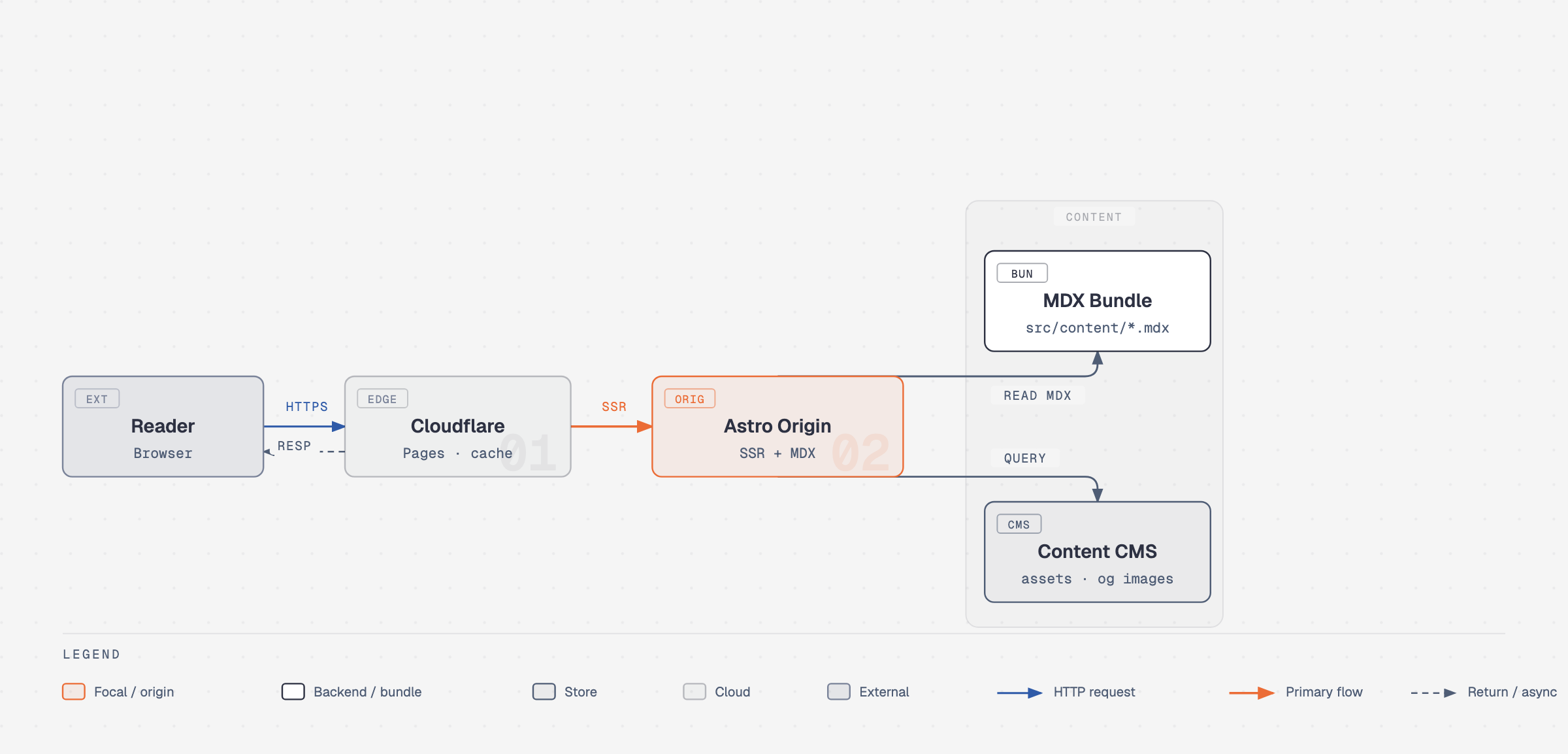
Architecture diagram: Orthogonal connectors, mono sublabels, and single flame-accent focal element.
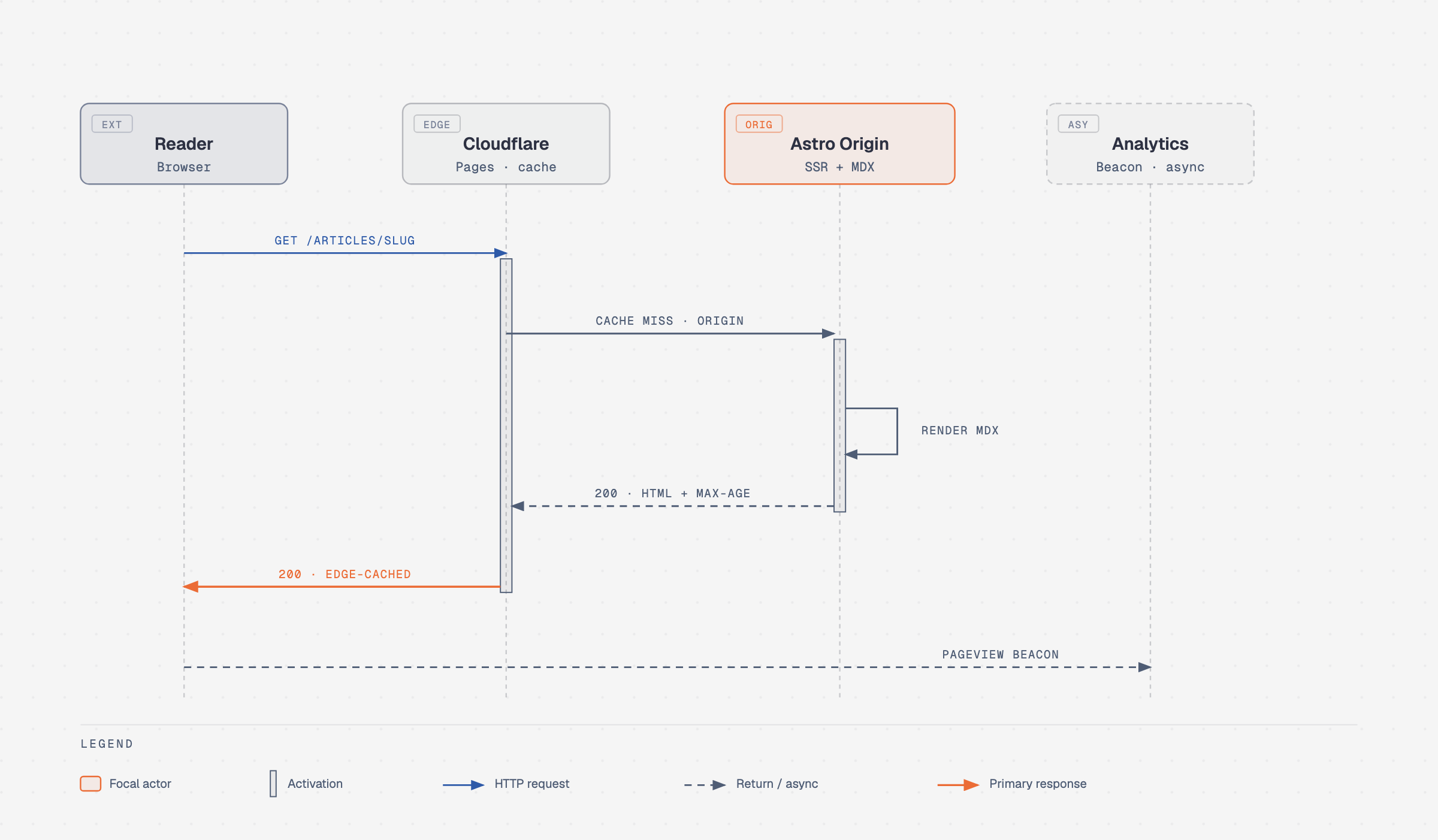
Sequence flow: Lifelines, request-response payloads, and ALT branching fragments.
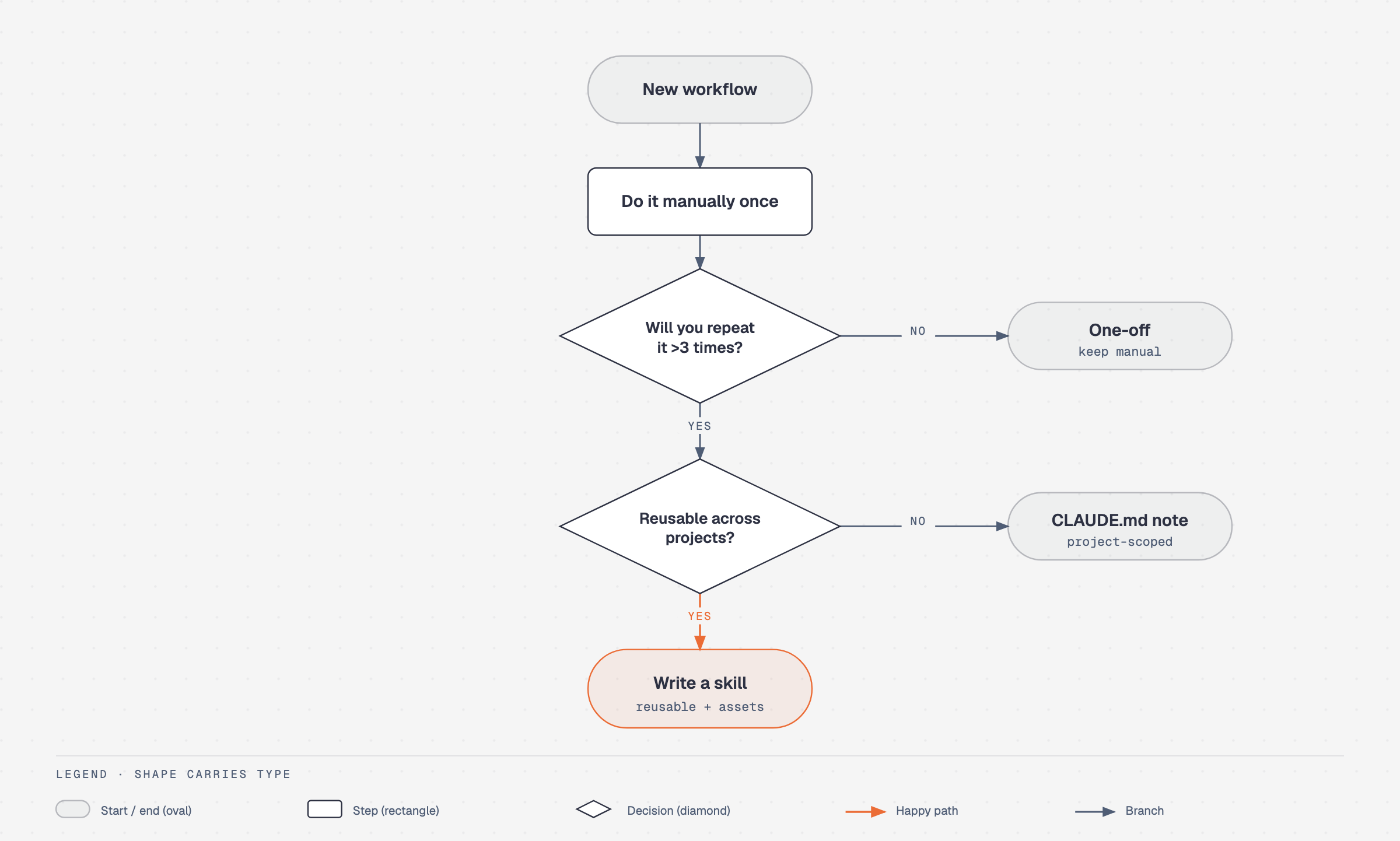
Editorial flowchart: 4px grid alignment, balanced node density, and zero drop shadows.
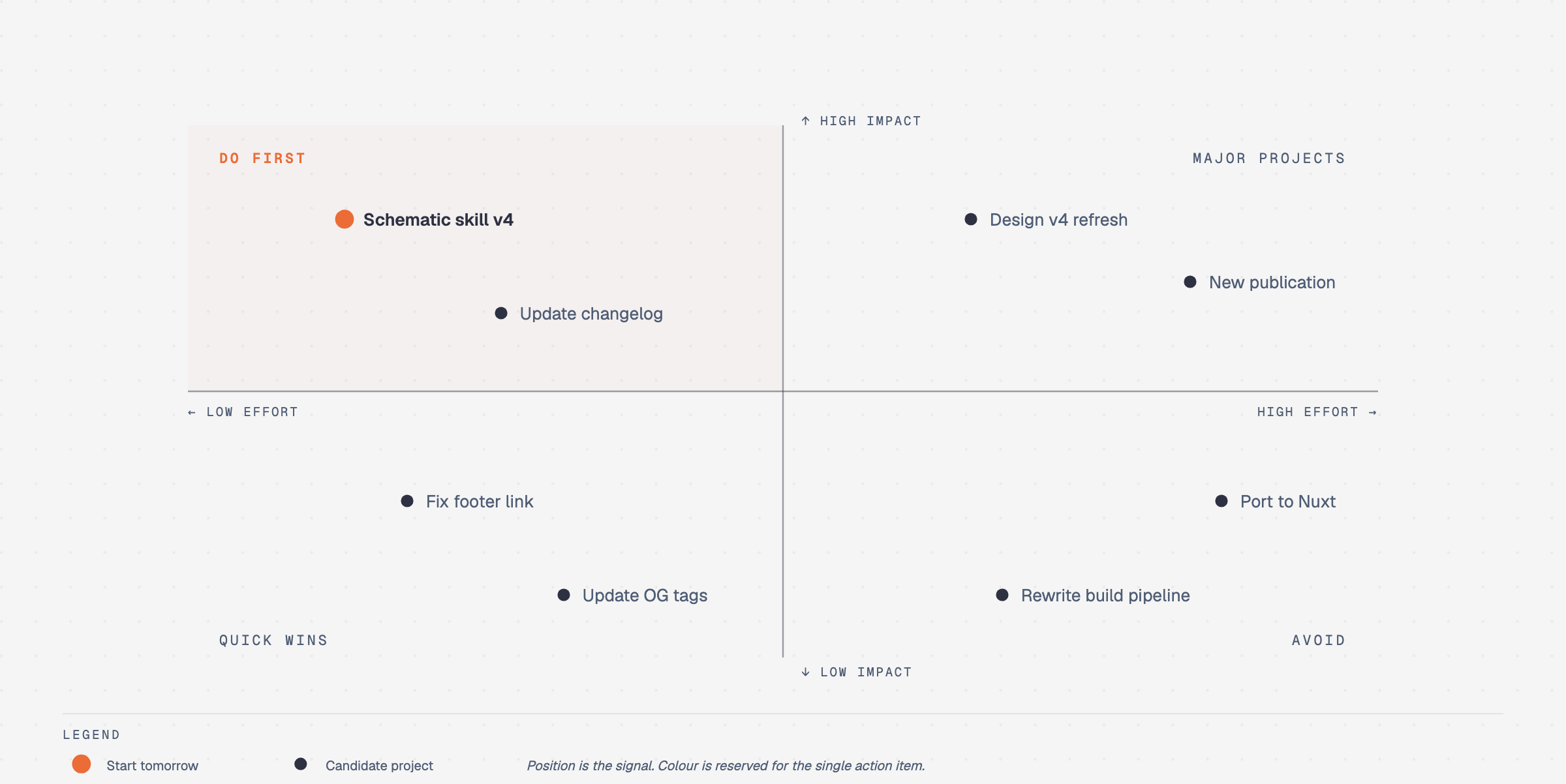
Quadrant positioning: 2-axis matrix with clear category clustering and semantic labels.
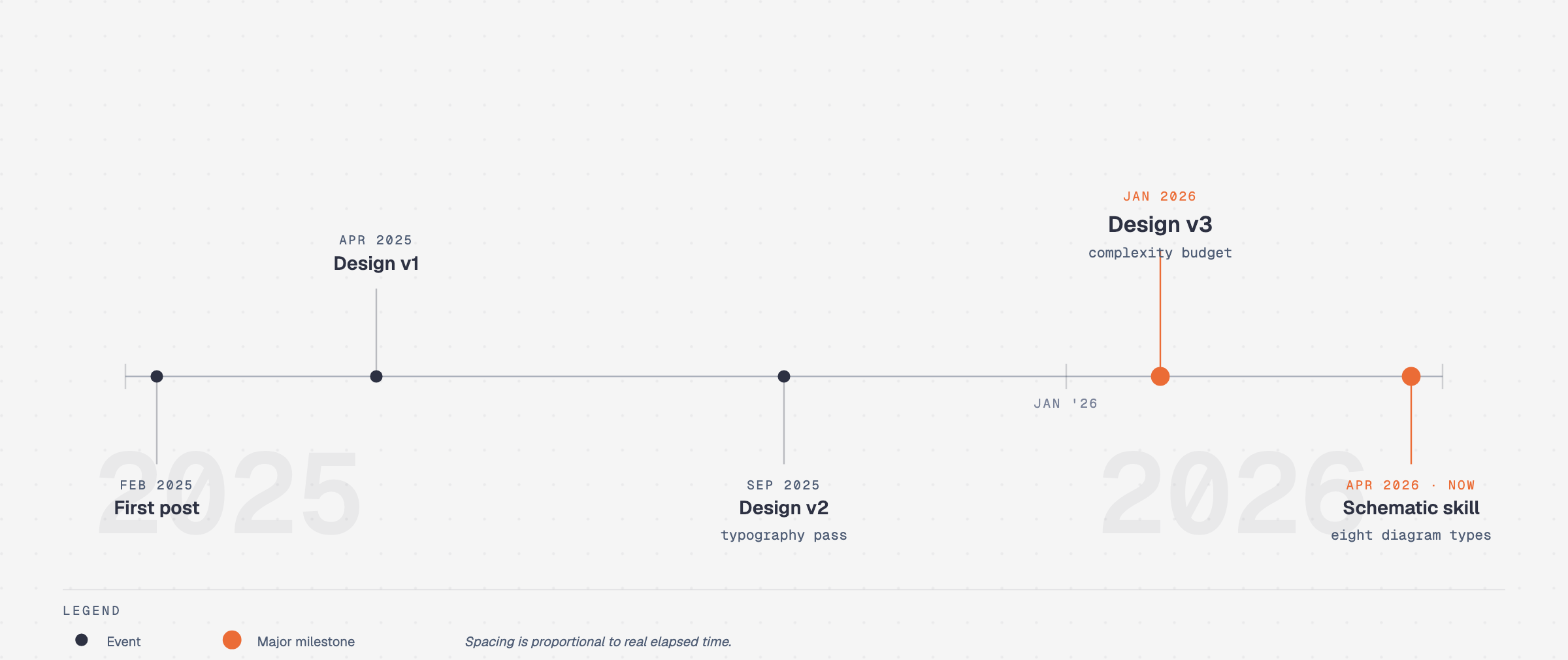
Timeline & Milestones: Clean horizontal spine with dates, milestones, and status tags.
Architecture (official skill topology)
LLM Agent Host (Claude Code / Codex / Factory Droid / Pi / Hermes)
                        │
                        ▼
            skills/diagram-design/SKILL.md (Router & Principles)
                        │
       ┌────────────────┼────────────────┐
       ▼                ▼                ▼
references/type-*.md  references/      references/
(Layout Grammar)      style-guide.md   semantic-patterns.md
       │              (Brand Tokens)   (Queues/Bottlenecks)
       └────────────────┬────────────────┘
                        ▼
           Self-Contained Output File (.html)
     ┌────────────────────────────────────────┐
     │ • Semantic HTML + Inline Accessible SVG│
     │ • 4px coordinate grid & 1 accent color │
     │ • Zero runtime JS / Zero build step    │
     └────────────────────────────────────────┘
                        │ (Optional Verification)
                        ▼
      Automated Layout & Lint Gates (Python + Playwright)
  lint-skin.py · lint-render.py · verify-geometry.py · self_check.py
Why HTML + CSS Beats Fragile Full-Canvas SVG
A common failure mode with raw SVG diagramming tools is visual fragility:
- Font & Text Truncation: Fixed SVG
<text>nodes cannot wrap or reflow automatically. If a user’s browser renders a fallback font with a 5% wider character bounding box, text overflows container borders or gets clipped byclipPath. - Mobile Viewport Breakage: Large SVG
viewBox="0 0 1200 800"canvases shrink proportionally on mobile screens, turning labels into unreadable 4px micro-text. - Accessibility Black Hole: Screen readers and search engine crawlers struggle to extract structural meaning from nested
<g>and<path>coordinates.
Diagram Design solves this by treating HTML as the carrier of meaning and SVG as the spatial connector:
- Structural metadata (headings, summary cards, bulleted notes, technical specs) is rendered in semantic HTML.
- Connectors and directional spines are drawn as clean, accessible SVG (
role="img"with resolvingaria-labelledby). - The 4px coordinate grid and automated Chromium test suite (
lint-render.py) verify that rendered text never clips or overflows across viewports.
Stack (from repository)
| Layer | Choices |
|---|---|
| Format | Standalone HTML5 + inline SVG (role="img", aria-labelledby, <title>, <desc>) |
| Design Rules | 4px coordinate grid, 1 accent color, 1px hairline strokes, max 10px radius, target density 4/10 |
| Typography | Instrument Serif (display/callouts), Geist Sans (node labels), Geist Mono (technical ports/types) |
| Runtime | In-context markdown skill + Python CLI extractors (drawio_extract.py, mermaid_extract.py, self_check.py) |
| Host Support | Claude Code, Codex, Factory Droid, Pi, Hermes Agent, OpenCode, Antigravity |
| Quality Gates | Headless Chromium pixel-diffing (lint-render.py), geometric label placement masking (verify-geometry.py), a11y linter |
| Export | Standalone SVG (Google Fonts embedded) · PNG rasterization (via Playwright at 2×) |
Features that matter for a stack decision
- Zero-JS, zero-build output — Opens by double-clicking; hostable anywhere without bundling or iframe sandboxing headaches.
- Context-efficient agent routing — Loads only the active type spec into memory (~1.5k tokens) instead of a massive monolith.
- Semantic brand contract — All diagrams inherit semantic roles (
bg-paper,text-ink,border-line,text-accent) rather than hardcoded hex values. - draw.io & Mermaid modernization — Cleans up legacy engineering spaghetti diagrams without redrawing by hand in Figma.
- Strict mathematical and geometric quality gates — CI checks rendered bounding boxes in headless Chromium to catch text clipping, overflowing viewports, and color contrast failures.
Cost breakdown
| Path | Reference cost | What you get |
|---|---|---|
| Diagram Design (local OSS skill) | $0/mo license + your LLM API tokens | 39 editorial grammars, brand onboarding, HTML/SVG export; runs entirely inside your existing agent host |
| Eraser.io (managed SaaS) | Pro from $10/user/mo | Cloud architecture canvas, markdown docs integration, cloud sync |
| Miro / Lucidchart (managed SaaS) | $8–$16/user/mo | Real-time multi-cursor whiteboarding, massive template library, non-technical team collaboration |
| Figma / FigJam | Pro from $12/editor/mo | Industry standard design canvas; high manual authoring friction for quick architecture flows |
| Mermaid.js / draw.io | $0/mo open-source / web | Free manual diagramming; dated visual output, manual alignment friction |
There is no seat fee for Diagram Design: spend is strictly your existing coding agent subscription or API usage. Savings vs visual SaaS seats only pencil out if your team authors documentation via code agents rather than collaborative live whiteboarding sessions.
The Good
- High-craft visual output without design fatigue — Eliminates the 30-minute Figma alignment rabbit hole while avoiding dated flowchart aesthetics.
- Zero runtime dependencies — No client-side React, Vue, D3, or Mermaid bundle required. The resulting HTML is self-contained and fast.
- Token-conscious progressive disclosure — Routine prompts only consume context for the requested layout type, leaving headroom for complex architectural code.
- Living brand integration — Brand onboarding extracts your real CSS tokens and font stacks with automated WCAG AA accessibility verification.
- draw.io and Mermaid import bridge — Migrates legacy technical documentation directly into cohesive editorial standards with an explicit change ledger.
- Playwright and Chromium CI test suite — The upstream repository enforces strict layout assertions, geometric clipping guards, and accessibility audits.
The Bad — what to know before adopting
- Not a multiplayer whiteboarding canvas. There is no real-time multi-cursor UI, drag-and-drop node snapping, or sticky-note collaboration. It is an agent code-generation workflow, not a Miro or Excalidraw substitute.
- Output fidelity is bound to agent spatial intelligence. While the layout grammars provide explicit coordinates, weaker or non-frontier LLMs can still misplace nodes or miscalculate SVG viewBox boundaries without running
self_check.py. - Static by design. Motion is deliberately restricted to sequential step/reveal/loop with an immediate static first frame for accessibility; it is not a tool for interactive canvas simulations.
- Local profile discipline required. Managing brand guidelines for multiple client workspaces requires placing
.diagram-designmarker files or maintaining profiles under~/.diagram-design/profiles/<slug>.md. - PNG export requires local Python/Playwright. While HTML and SVG exports are instant, generating 2× PNGs requires a local Python environment with
playwright install chromium.
When to use / When to skip
Use Diagram Design if:
- You want editorial, publication-grade architecture diagrams in your documentation, blog posts, or pitch decks without opening Figma.
- Your engineering team already uses AI coding agents (Claude Code, Codex, Factory Droid, Pi, Antigravity) for development.
- You want self-contained HTML+SVG artifacts that match your brand palette and typography in 60 seconds.
- You need to modernize legacy draw.io or Mermaid diagrams into clean, executive-ready visuals.
- You refuse to pay per-seat SaaS taxes for static diagram authoring.
Skip if:
- You need real-time multiplayer collaborative whiteboarding with non-technical stakeholders—stay on Miro, FigJam, or Eraser.
- You need a visual drag-and-drop GUI to nudge boxes manually.
- Your team does not use CLI coding agents or prefers hosted WYSIWYG interfaces.
- You need dynamic, data-driven real-time canvas charting (use D3.js or Observable instead).
Prerequisites (official path)
- Agent Host: Claude Code, Codex, Factory Droid, Pi, Hermes Agent, or an Agent Skills-compatible runner.
- Web Browser: Any modern browser to preview the output
.htmlfiles offline. - Optional PNG Export: Python 3.10+ with
pip install playwright && playwright install chromium.
Setup checklist (official path)
-
Install into your agent host:
- Claude Code:
/plugin marketplace add cathrynlavery/diagram-design /plugin install diagram-design@diagram-design - Codex:
codex plugin marketplace add cathrynlavery/diagram-design codex plugin add diagram-design@diagram-design - Factory Droid:
droid plugin marketplace add https://github.com/cathrynlavery/diagram-design droid plugin install diagram-design@diagram-design --scope user - Pi:
pi install https://github.com/cathrynlavery/diagram-design
- Claude Code:
-
Onboard your brand (60 seconds): In your agent chat, run:
onboard diagram-design to https://yourdomain.comThe agent extracts your background, text, accent colors, and font stack, verifies WCAG AA contrast, and saves your tokens.
-
Generate your first diagram: Ask in natural language:
"Create an architecture diagram of my stack: Next.js frontend, Cloudflare Worker API, Postgres database, and Redis cache." -
Redraw existing diagrams (optional):
# Redraw draw.io file for an executive deck
/diagram-design:import-drawio architecture.drawio --size=slide-16x9 --detail=simplified --audience=executive

# Redraw Markdown Mermaid block
/diagram-design:import-mermaid README.md --diagram=all
Our recommendation
Apply the same Keep / Configure / Replace / Build lens as every ReframeHub note (start with the Stack Decision Checklist if you want a self-serve pass).
- As a developer documentation tool: Configure Diagram Design into your coding agents immediately. It replaces hours of Figma alignment and produces significantly cleaner visuals than Mermaid.js.
- As a team visual whiteboard: Keep Miro, FigJam, or Eraser for real-time collaborative brainstorming and stakeholder mapping. Diagram Design is an authoring engine, not a multiplayer whiteboard.
- As a design reference: One of the most disciplined open-source graphic systems available for technical diagrams—worth studying for its progressive disclosure routing and 4px layout math.
Need help evaluating visual design tooling, documentation architecture, or SaaS sprawl across your stack? Book a Reframe audit for visual stack ($199). For a parallel local-first design evaluation, see Open Design; for general open-source adoption criteria, see open-source evaluation.
Need help evaluating diagram tooling, visual stack, or SaaS sprawl?
Reframe ($199) evaluates your team's visual stack—Diagram Design vs Miro/Eraser vs Figma—balancing craft, authoring speed, and collaboration overhead. Diagnosis only.
Fixed $199 fee · 100% vendor-neutral review · 3-day delivery guarantee